> For the complete documentation index, see [llms.txt](https://taotools-documentation.gitbook.io/taotools-documentation/llms.txt). Markdown versions of documentation pages are available by appending `.md` to page URLs; this page is available as [Markdown](https://taotools-documentation.gitbook.io/taotools-documentation/dapp-and-bot-features/e-imaginate.md).
# E-Imaginate
Text-to-image models are perhaps the most widely used functionalities of AI. TAOTools' E-Imaginate subnet offers such a service. To get started with this subnet, simply follow the below steps. This subnet is available both in our Web dApp, as well as through our Telegram bot.\
\
To access E-Imaginate through our Web dApp, navigate to our [website](https://taotools-documentation.gitbook.io/taotools-documentation/dapp-and-bot-features/www.taotools.ai) and hit the 'Get Started' button. From here, you will be presented with the available Bittensor subnets. Hit 'E-Imaginate' to enter this subnet. Simply input any selection of words or description and hit 'Send' to start generating an AI Image!
Subnet Main Menu
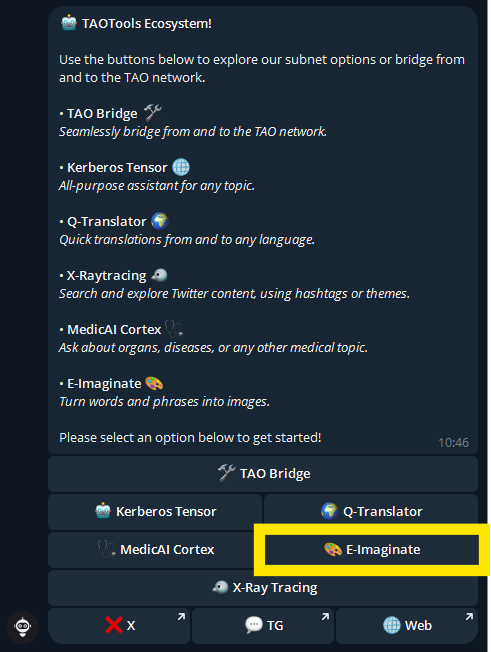
To access E-Imaginate through our Telegram bot, navigate to our [Website](https://taotools-documentation.gitbook.io/taotools-documentation/dapp-and-bot-features/www.taotools.ai) and hit the 'Open Bot' button or navigate directly to our [Telegram Bot.](https://t.me/TAOToolsInteractBot) Simply hit the 'E-Imaginate' button after prompting /start to open this subnet. From here, input a prompt to generate an AI image around that topic.